Microsoft Surface Pro 10 Review
Our Verdict
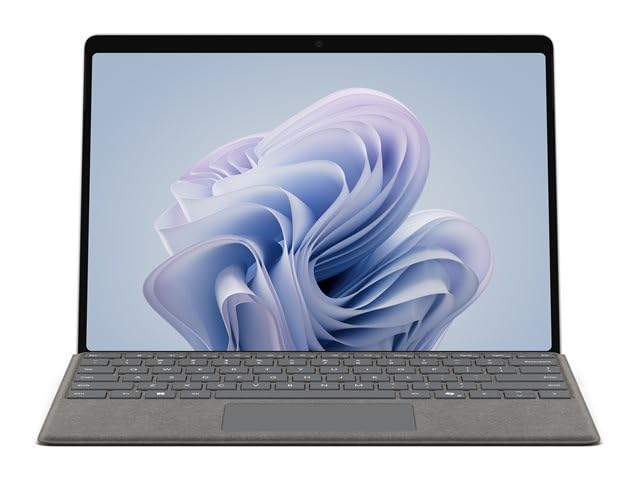
The Surface Pro 10 is the best Windows tablet — full desktop software capability in a tablet chassis for professionals who can't compromise.
Pros & Cons
+ Pros
- +Full Windows 11 — run any desktop software
- +Intel Core Ultra 7 performance
- +13" 2880×1920 PixelSense display
- +Adjustable kickstand for any angle
- +Copilot AI integration
− Cons
- −Type Cover keyboard sold separately
- −Heavy and expensive
- −Battery life behind iPad Pro (8 hours typical)
- −Fan noise under load
In-Depth Review
The Microsoft Surface Pro 10 is the tablet for users who need full Windows capability without compromise. Intel Core Ultra 7 enables genuine desktop-class applications — Adobe Creative Suite, AutoCAD, Visual Studio — in a tablet chassis. The 13" PixelSense display at 2880×1920 is sharp, bright, and touch-accurate. The kickstand adjusts to any angle for any working position, and the Type Cover keyboard (sold separately) transforms it into a capable laptop replacement. AI features include a Copilot key and NPU for on-device processing. For business users who need Windows on the go, it remains the definitive choice.
Specifications
| Processor | Intel Core Ultra 7 165U |
| RAM | 16 GB – 64 GB |
| Storage | 256 GB – 1 TB SSD |
| Display | 13" PixelSense, 2880×1920, 120Hz |
| Battery | Up to 10 hours (typical 8 hours) |
| Connectivity | Wi-Fi 6E, Bluetooth 5.3, optional 5G |
| OS | Windows 11 |
Disclosure: We may earn a commission when you buy through links on this site, at no extra cost to you.